How to Set Up the Perfect Home Office: The Complete Beginner’s Guide (2026)
Why Your Home Office Setup Matters More Than You Think
You told yourself the kitchen table would be fine. Just temporary.
Six months later, your back aches by noon, you’re squinting at a laptop screen barely bigger than a legal pad, and your “office” doubles as the spot where your partner leaves the mail. Sound familiar?
Here’s the truth most people learn the hard way: your workspace directly shapes your output, your energy, and your health. A well-designed home office isn’t a luxury — it’s a force multiplier. The right chair alone can recover the two hours a day you lose to discomfort and distraction.
This guide is built for people setting up their first dedicated home office. We’ll walk you through every decision, in the right order, so you spend your money wisely and end up with a space that actually works. Let’s build something great.
Step 1: Choose the Right Desk — Your Foundation
Everything in your home office radiates outward from your desk. Get this wrong and no amount of great gear will save you.
Size: Bigger Than You Think You Need
Most first-time home office builders underestimate how much surface area real work requires. A monitor, a keyboard, a notebook, a coffee mug, a few documents — it adds up fast. Aim for at minimum 48 inches wide and 24 inches deep. If your space allows it, 60–72 inches gives you genuine breathing room.
Sit-Stand vs. Fixed Height
Standing desks aren’t a gimmick. Research consistently links prolonged sitting to fatigue, back pain, and reduced focus. An electric sit-stand desk lets you alternate postures throughout the day, which is one of the most impactful single upgrades you can make to your work-from-home health.
That said, a quality fixed-height desk beats a cheap standing desk every time. Wobble is the enemy of productivity.
Our picks:
- 📐 Best Overall Desk: See our full desk reviews at HomeOfficePick → — we’ve tested over a dozen models across every budget.
- 📐 Best Sit-Stand Desk: Our standing desk buying guide → covers budget options all the way up to premium motorized frames.
Quick tip: Before you buy, sit down and measure the height from the floor to your elbows when bent at 90°. That’s your ideal desk height — usually somewhere between 28–30 inches for most adults.
Step 2: Pick an Ergonomic Chair — Protect Your Body
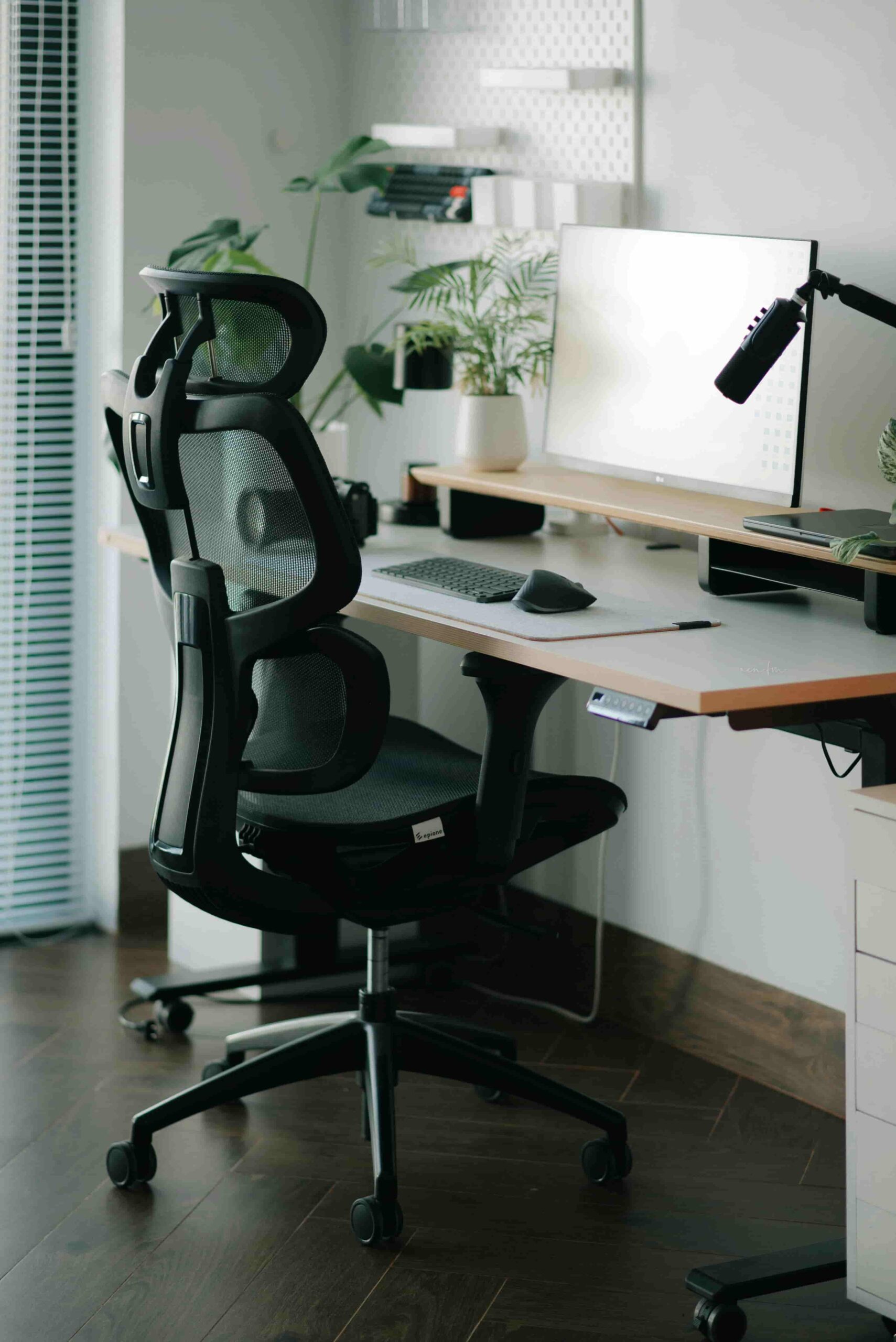
Your chair is the single most important purchase in your home office. You will spend thousands of hours in it. This is not where you cut corners.
What “Ergonomic” Actually Means
A true ergonomic chair adjusts to your body — not the other way around. Look for these must-have features:
- Lumbar support that is adjustable in both height and depth
- Seat height adjustment (ideally pneumatic gas lift)
- Armrests that adjust in height, width, and ideally forward/backward
- Seat depth adjustment so your knees aren’t hanging off the edge
- Recline tension control for those moments you need to think
The Budget Question
You don’t need to spend $1,500 on a Herman Miller to get real ergonomic support. There are excellent chairs in the $300–$500 range. But anything under $150 is almost certainly going to compromise your back — and that’s a false economy measured in chiropractor bills.
Our picks:
- 🪑 Best Ergonomic Chair Under $400: Read our detailed ergonomic chair guide → — we break down the top contenders with hands-on testing notes.
- 🪑 Best Budget Chair That Doesn’t Sacrifice Your Spine: Covered in the same guide.
Setup checklist for your chair:
- [ ] Feet flat on the floor (use a footrest if needed)
- [ ] Thighs roughly parallel to the ground
- [ ] Lower back making contact with lumbar support
- [ ] Elbows at approximately desk height
- [ ] Eyes level with the top third of your monitor
Step 3: Monitor Arm Setup — Command Your View
Working from a laptop screen all day is the ergonomic equivalent of reading a book held six inches from your face. A proper external monitor arm transforms your productivity.
Choosing Your Monitor
For most knowledge workers, a 27-inch monitor at 1440p (QHD) resolution hits the sweet spot of screen real estate and pixel density. If your work involves color-critical tasks like design or photo editing, prioritize an IPS panel for accurate colors. If you game after hours, look for a higher refresh rate.
Consider a dual monitor setup if you regularly work across multiple documents, applications, or browser windows. The productivity gains are real.
Why a Monitor Arm Changes Everything
Your monitor should sit at arm’s length away, with the top of the screen at or slightly below eye level. A monitor arm:
- Frees up valuable desk real estate
- Lets you dial in the exact ergonomic position
- Makes it easy to pivot the screen for collaboration
- Looks vastly cleaner than a clunky stock stand
Our picks:.
- 💪 Best Monitor Arms: Our monitor arm buying guide → covers single, dual, and ultrawide arm options.
Step 4: Lighting — The Most Underrated Factor in Your Setup
Bad lighting ruins productivity and makes you look terrible on video calls. Good lighting does the opposite of both.
Natural Light: Your Best Friend and Worst Enemy
Natural light improves mood, reduces eye fatigue, and is genuinely free. Position your desk perpendicular to windows — not facing them (glare on your screen) and not with your back to them (glare behind you on calls). Side lighting is the goal.
Task Lighting
A quality desk lamp with adjustable color temperature lets you dial from warm, relaxed tones in the morning to cooler, focused light during peak work hours. Look for lamps with CRI (Color Rendering Index) above 90 for the most natural light.
Video Call Lighting
Here’s what no one tells first-time home office builders: the built-in camera on your laptop combined with overhead ceiling lighting makes you look like a witness in a crime documentary. A ring light or a small LED key light positioned in front of you (behind your monitor) will make an enormous difference in how you present on calls.
Our picks:
- 💡 Best Desk Lamps for Home Offices: Read our lighting guide → — we test color temperature, brightness ranges, and build quality.
Step 5: Personal Touches and Plants — Make It Yours
Function without soul is just a cubicle. The most productive home offices feel genuinely good to spend time in.
Why Plants Belong in Your Office
Multiple studies have found that the presence of plants in workspaces reduces stress, improves air quality, and increases reported wellbeing. You don’t need a green thumb. A pothos, snake plant, or ZZ plant will survive nearly any lighting condition and a forgetful watering schedule.
Personalize Strategically
- A piece of art or a print you genuinely love on the wall behind you
- A few meaningful objects on the desk — not clutter, just anchors
- A quality mouse pad that ties the color palette together
- Acoustic panels if you’re in a reverberant space (they also look intentional)
The goal is a space that signals to your brain: this is where good work happens.
Common Mistakes First-Time Home Office Builders Make
Even with the best intentions, these errors come up again and again:
1. Buying the chair last. People spend on monitors and desks and then budget-shop the chair. It should be the opposite.
2. Choosing a desk too small. You will always want more surface area. Always.
3. Skipping the monitor arm. It feels optional until you’ve used one. Then it’s not.
4. Ignoring lighting until the first video call. That panicked Amazon order the night before a big client call is a rite of passage. Skip it.
5. Under-estimating cable chaos. Buy cable management supplies before you set up your desk, not after.
6. Setting up in a high-traffic area. If family members regularly walk through your sightline or behind you during calls, you will lose focus and professionalism constantly.
7. No dedicated storage. Even a small set of shelves or a rolling drawer unit makes a significant difference in keeping your space functional.
Your Complete Home Office Shopping Checklist
Use this as your master list. We’ve linked each category to our in-depth HomeOfficePick reviews — click through before you buy.
| Category | Priority | Our Review |
|---|---|---|
| 🪑 Ergonomic Chair | Essential — Buy First | Chair Reviews → |
| 📐 Desk (sit-stand or fixed) | Essential | Desk Reviews → |
| 💪 Monitor Arm | Highly Recommended | Monitor Arm Reviews → |
| ⌨️ External Keyboard | Recommended | Keyboard Reviews → |
| 🖱️ Ergonomic Mouse | Recommended | Mouse Reviews → |
| 💡 Desk Lamp (adjustable color temp) | Recommended | Lighting Reviews → |
| 🎥 Webcam or Ring Light | Recommended for calls | Video Call Setup Guide → |
💡 Pro Tip: All products in our reviews link directly to Amazon with our affiliate links. Prices and availability update regularly — check our individual review pages for the most current recommendations.
You’re Closer Than You Think
Setting up a home office can feel overwhelming when you look at it all at once. But here’s the perspective that helps: you don’t have to do it all in one day, or all at once.
Start with your chair and your desk. Get those right, and you’ve solved 80% of the ergonomic equation. Add a monitor arm. Fix your lighting. Then layer in the rest as your setup evolves.
The goal isn’t perfection — it’s a space that helps you show up and do your best work. HomeOfficePick exists to make every one of those decisions easier, with honest reviews and clear recommendations you can trust.
Ready to dive deeper? Start with our most-read review: The Best Ergonomic Chairs of 2025 →
Affiliate Disclosure
HomeOfficePick is a participant in the Amazon Services LLC Associates Program, an affiliate advertising program designed to provide a means for sites to earn advertising fees by advertising and linking to Amazon.com. We also participate in other affiliate programs.
When you click a product link on HomeOfficePick and make a qualifying purchase, we may earn a small commission at no additional cost to you. This never influences which products we recommend — our editorial process is independent, and we only feature products we’ve genuinely evaluated. Our goal is simple: help you make great buying decisions. Thank you for supporting HomeOfficePick.
Have a question about your specific setup? Drop it in the comments below — we read every one.
— The HomeOfficePick Team